

Manage organization projects
A project groups related resources and access within one organization. Organization members can use it only when they have a suitable organization or project role.
Open Settings and Projects. The list shows each title, slug, user count, and connected services.
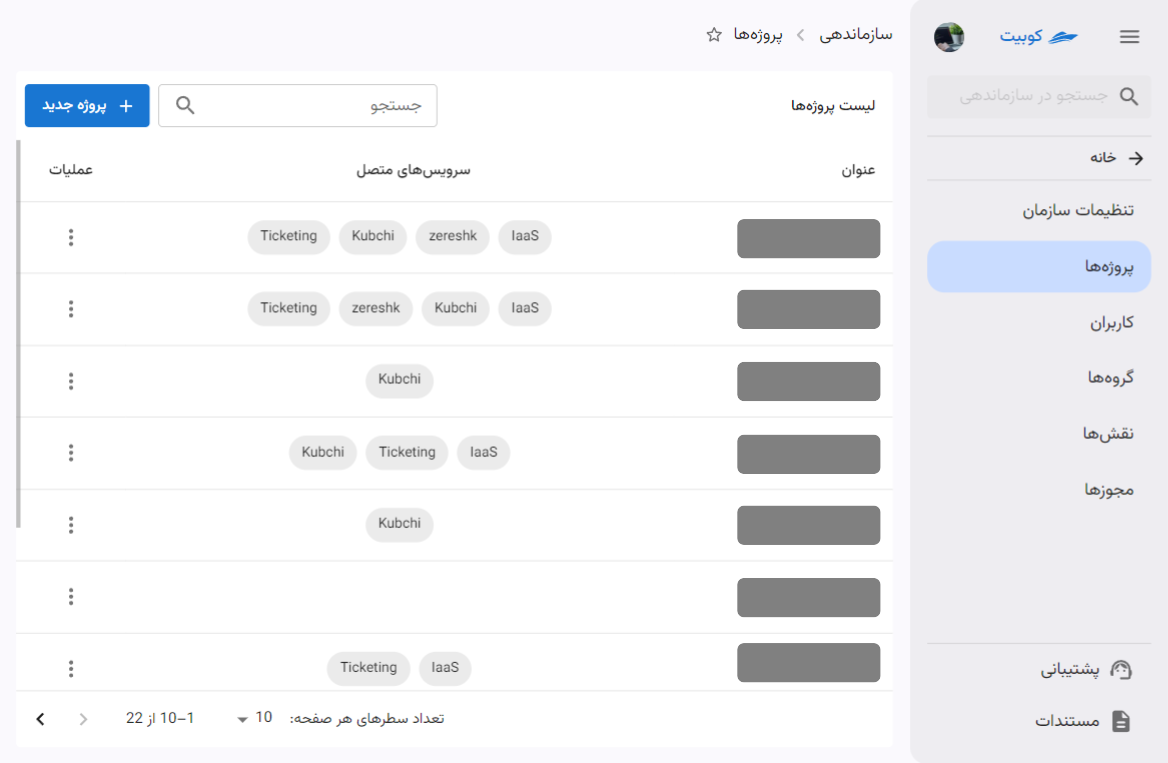
Create a project
Select New Project and enter a title and slug. The title is displayed to users; the slug identifies the project in URLs.
Use letters, numbers, and hyphens. Do not start or end with a hyphen or use consecutive hyphens. Choose a short stable value to avoid breaking dependent URLs or settings.
Creating a project does not create a service or resource. Connect the required services afterward, then create resources within the project.
Edit a project
Open the project and select edit. The current interface allows both title and slug changes. Changing the slug may affect panel URLs, scripts, and integrations, so check consumers before saving.
Changing either value does not transfer resources to another project or organization.
Connect a service to a project
Connect a project-scoped product before creating its resources. The project then appears under that product. Resource instructions remain in the product documentation.
Before disconnecting a service, review dependent resources. Some services cannot disconnect until project resources are removed, and disconnecting is not a substitute for safely deleting them.
User and group access
The project page lists users and groups with roles in that project. Group-derived roles are marked separately from direct user roles.
Select Add Access, choose User or Group, then choose the member or group and role. A role added here is limited to this project.
Direct user project access
Select one organization member and one role. Direct access suits individual exceptions. For a shared responsibility, use a group. See Assign a direct role to review or remove it from the member page.
Group project access
Select a group and role. Every current and future group member receives that role in the project. See Grant group access to change members or remove the assignment.
Effective project access
Access may come from a direct project role, a group's project role, or an organization role valid across projects. Removing one assignment may leave the same permission through another path.
Permissions are never assigned directly; they are placed in a role, and the role is assigned in project scope. See Create a custom role.
Delete a project
Project deletion is irreversible and may affect resources and service connections. Review resources, connected services, member access, and every setting that uses the slug.
If a service or resource blocks deletion, remove its resources according to that product's documentation, disconnect it, then confirm the exact project name before deleting.